

Have you ever wondered if you could turn Canva into a side hustle for mums or how to use Canva as side hustle for beginners? Well, continue to read this article.
Your creative hobbies could actually pay your monthly mortgage while you sleep. As a stay at home mum, I spent years looking for flexible methods to earn money without sacrificing family time. Unlike traditional side hustles, selling digital products doesn’t require inventory, shipping, or dealing with after sales defects. There are no boxes piling up in the hallway and no trips to the post office with toddlers in tow. Once a digital asset is created, whether it’s a printable planner, budgeting template, or a Canva design it can be sold over and over again. That’s where the passive income element comes in.
Another reason I chose digital products was the low barrier to entry. I didn’t need advanced tech skills or expensive software. Tools like Canva made it easy to design professional-looking templates and printables without a design background. Within weeks, I was creating products that people were actually willing to pay for.
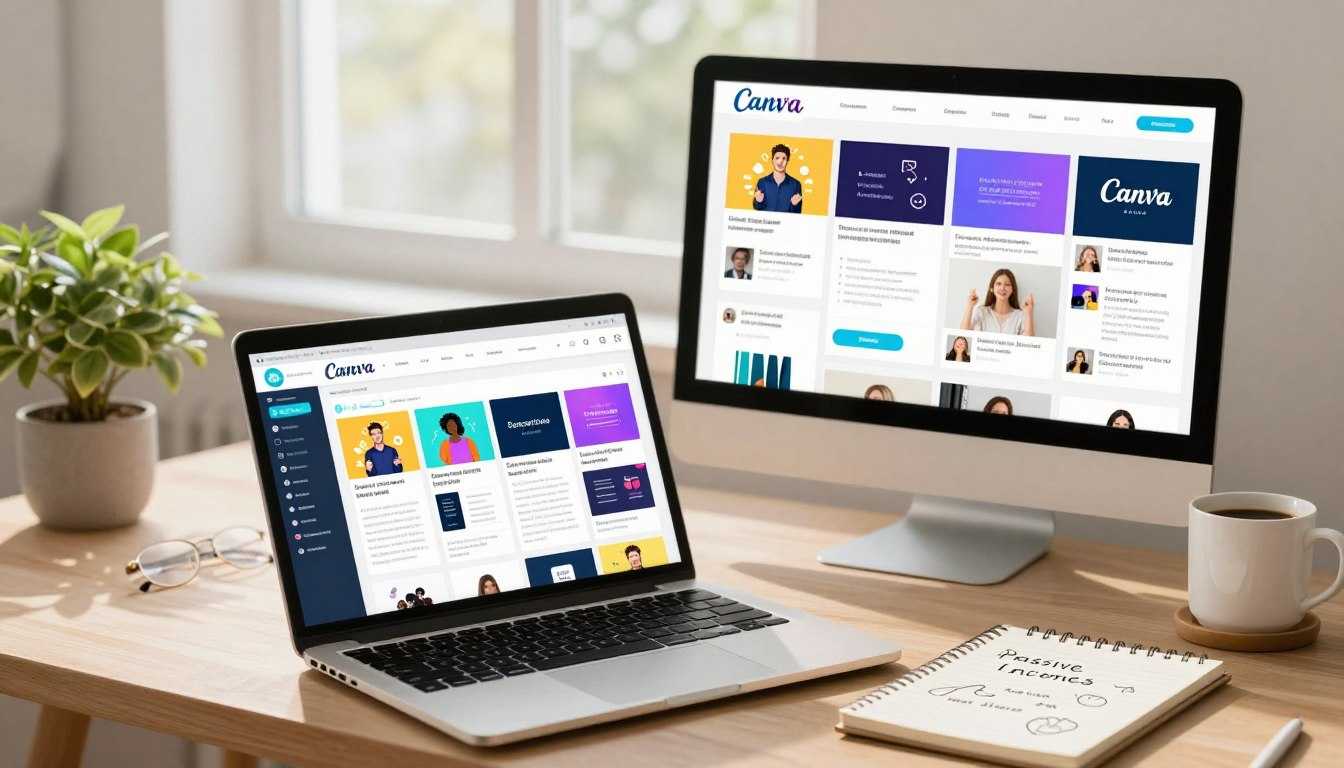
Ways to Make Money with Canva
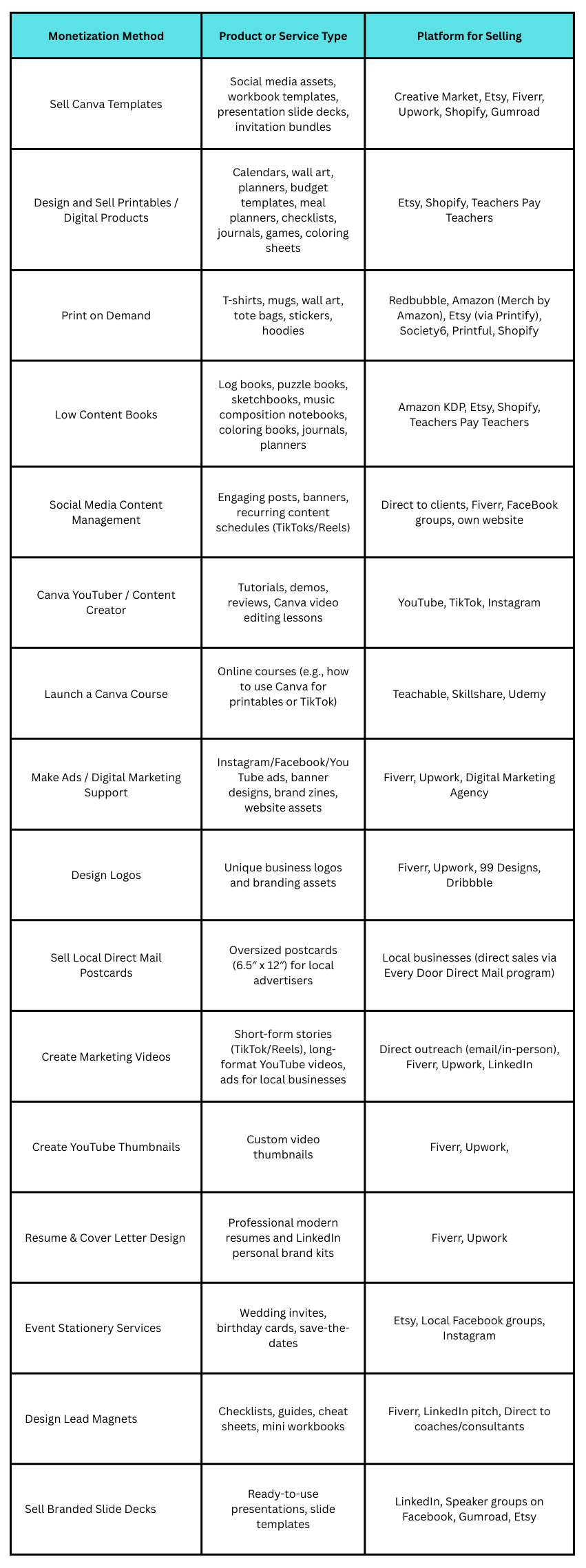
If you’ve ever used Canva to whip up a quick design for a birthday invitation, you already have some of the basic skills to start making money with it. The platform that most of us use for free to make social media posts or party invites is the same tool people are using to build legitimate side hustles and even full-time businesses. Based on my extensive research I have identified a number of different ways you can use Canva to earn money
How My Canva Side Hustle Began
Look, I’m not going to pretend I had some brilliant business idea. I was just a stressed-out mum trying to figure out how to make ends meet and wondering if it was even possible to make money with Canva in a realistic way.
Back in 2012, I spent weeks researching journals and activity books for my kids. I started noticing there was a growing market for thoughtful, practical products — especially ones that supported confidence and emotional growth. At the time, I was already using Canva for blog graphics, so I thought, why not try creating something myself? Nothing fancy. Just simple journal prompts. Questions and activities that might help a child see themselves differently:
“What made you smile today?”
“Something I’m proud of myself for”
“A challenge I faced and how I handled it”
Basic, but meaningful.
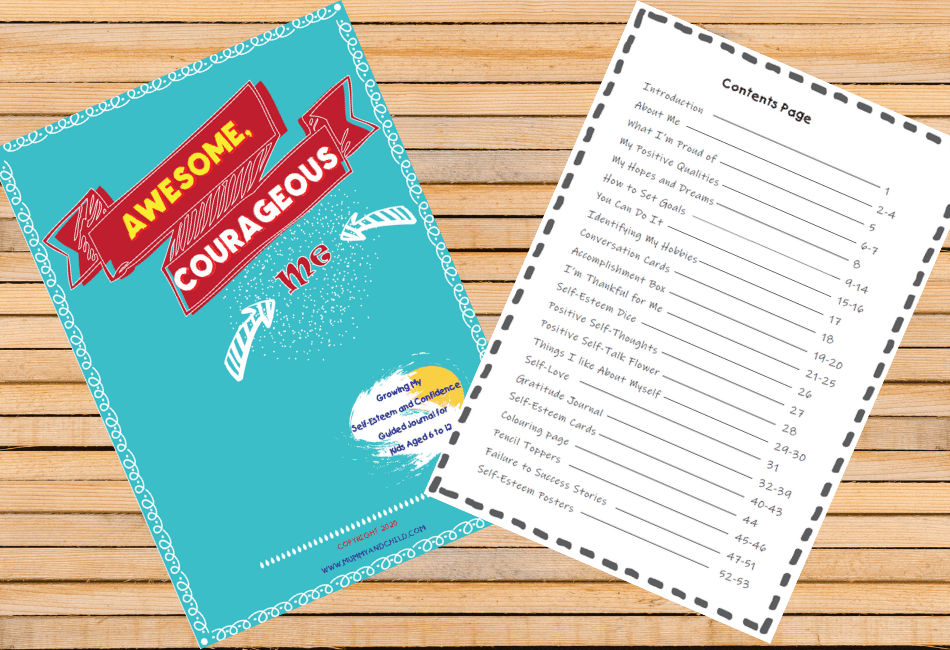

So, I created my first journal for my son first. We gave copies for free to a few mums from our mother’s group and kindergarten. The feedback surprised me. They loved it. They gave suggestions. We tweaked the layout. Improved the prompts. Refined the design.
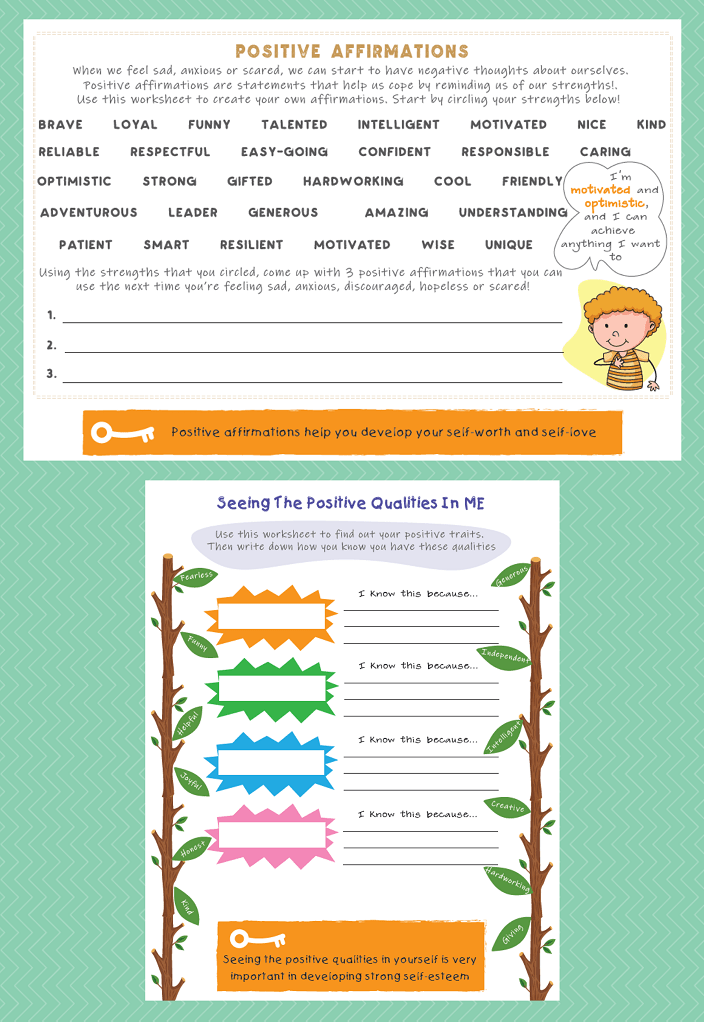
That was the beginning of my Canva side hustle.
Once I saw that people valued it, I began taking Canva more seriously. I learned the keyboard shortcuts. Set up brand kits. Created master templates. I stopped treating it like a hobby tool and started treating it like a business asset.
Evenings became my design time. I created planners for mums, budgeting sheets, meal planners, daily routines, holiday journals — all Canva digital products built around things I was already using in my own life.
My logic was simple: if I needed this, other parents probably did too.
As I kept adding more printables, a pattern started to emerge. The practical designs sold consistently. Bullet journals with clean layouts. Kids’ chore charts that actually worked. Weekly meal planners that reduced stress.
Then I noticed something else — returning customers.
That’s when it clicked. This wasn’t just a creative outlet. I was building a real Canva business.
I began treating it with structure:
- I researched what parents were actually searching for online
- I bundled related Canva printables into packs
- I created Pinterest-friendly mockups and preview images
- I wrote SEO-focused product descriptions
- I built an email list to nurture repeat buyers
This wasn’t about making pretty pages anymore. It was about solving real problems through well-designed Canva templates and printables.
Fast forward a few months, and what started as a quiet experiment turned into something substantial. That slow trickle of downloads became a steady stream of sales. Before I even realised it, I was earning well over a thousand a month selling printables created in Canva.
And the best part?
It didn’t pull me away from family. It gave me flexibility. It gave me ownership. And it proved that making money with Canva isn’t hype — it’s possible when you treat it like a real business.
My Step-by-Step Canva Workflow for Creating and Selling Digital Products
If there’s one thing that helped me turn Canva into a $4,000/month side hustle, it wasn’t talent.
It was the process.
In the beginning, I created whatever felt inspiring. Some designs sold. Some didn’t. It was unpredictable. Once I built a repeatable workflow, everything changed.
Here’s exactly how I research, create and sell digital products using Canva.
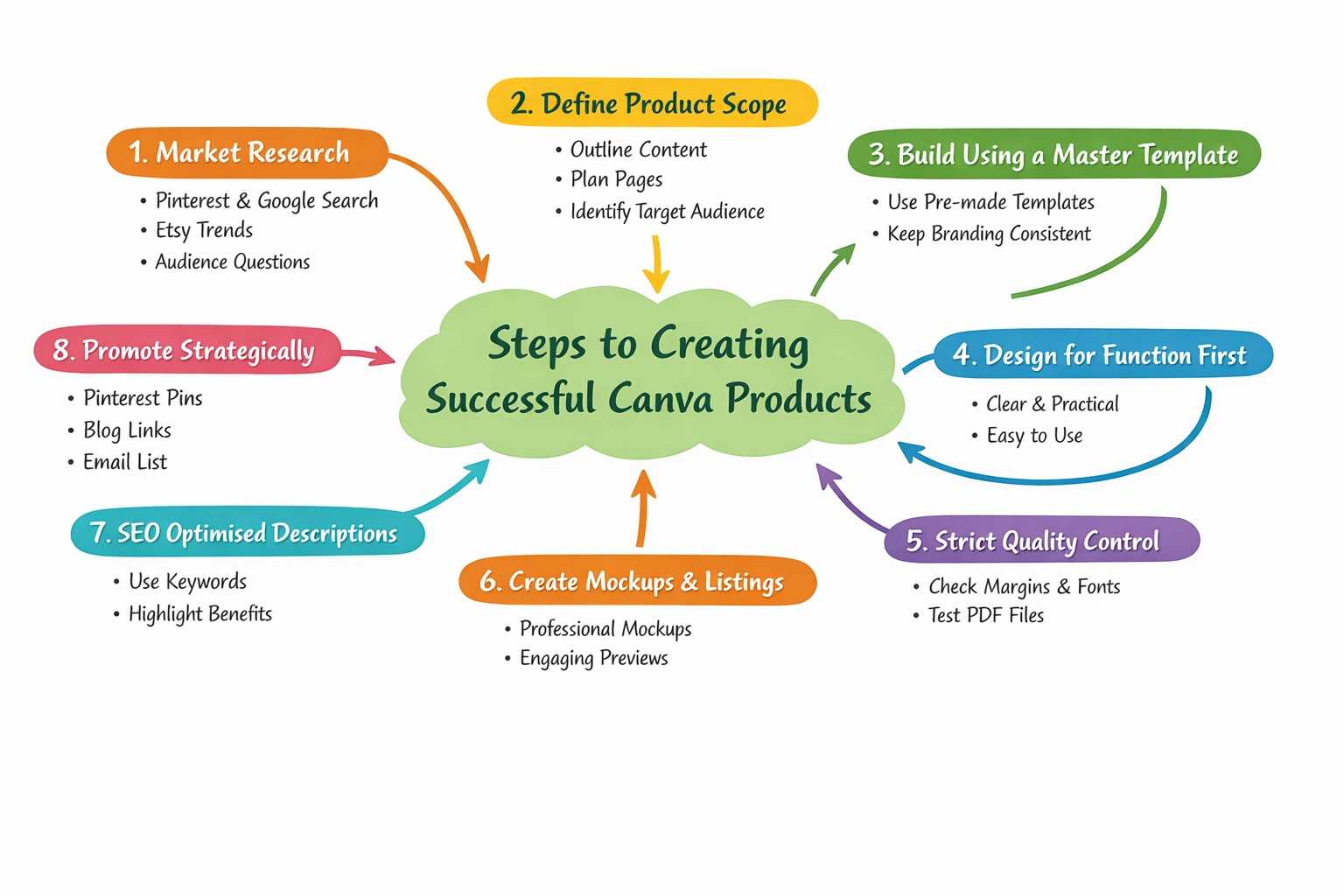
Step 1: Research What People Are Actually Searching For
Before I design anything, I validate the idea. I don’t guess. I look for demand.
I use:
Pinterest search suggestions
Google autocomplete
Etsy search bar
My blog analytics
Questions other mums ask me
For example, my kids’ journals didn’t come from a trend report. They came from noticing parents searching for confidence building activities and screen free printable ideas coupled with some of the emerging ‘trends’ at the time.
If I see repeated searches like:
“growth mindest kids journal”
“daily routine chart for kids”
“emotional intelligence for kids”
That’s my green light.
If no one is searching for it, I don’t create it.
Step 2: Define the Product Scope Before Opening Canva
I outline everything before I design.
For example:
How many pages?
What problem does this solve?
Is it standalone or part of a bundle?
Who is this for specifically?
Clarity here prevents design overwhelm. If it’s a printable journal, I’ll map out:
Cover page
Introduction page
15–20 structured prompts
Bonus worksheets
This keeps the product purposeful, not random.
Step 3: Build Using a Master Template System
I usually don’t design from scratch anymore. I duplicate a master template (faster time to market)
Inside Canva, I have:
Pre-set font pairings
Colour palette styles
Consistent margin spacing
Layout grid systems
Standardised cover designs
This keeps:
Branding consistent
Design professional
Creation time fast
A product that used to take weeks now takes days because I’m refining, not reinventing.
Step 4: Design for Function First, Aesthetics Second
This is something I learned the hard way. Pretty and useful both must be aligned.
I design with clarity:
Clean spacing
Easy-to-read fonts
Minimal clutter
Logical flow
Parents buying printables want practicality. I design as if I’m using it myself, because I often am.
Step 5: Quality Control Before Export
Before I download anything, I check:
Are margins printable?
Is alignment consistent?
Are fonts embedded properly?
Have I tested it as a PDF?
I export in high-quality PDF format for printables.
Step 6: Create Mockups and Listing Assets
A good product without good presentation won’t sell.
Inside Canva, I create:
Clean mockups on bright/clear background
Lifestyle previews
Pinterest-ready vertical pins
Product cover graphics
I always show:
What’s included
How many pages
Who it’s for
What problem it solves
Step 7: SEO-Optimised Product Descriptions
This is where many Canva sellers fail.
I include:
Clear keywords naturally
Problem & solution positioning
Use case examples
Benefit-focused language
Instead of:
“Printable journal PDF”
I write:
“Confidence-building printable journal for kids aged 6–10 designed to encourage self-reflection and emotional awareness.”
Step 9: Promote Strategically
I don’t rely on luck. My game plan:
Create multiple Pinterest pins
Link from related blog posts
Email my list
Interlink products
Traffic + consistency = recurring sales.
The Biggest Mistakes I Made and How to Avoid Them
Like any entrepreneur, I’ve made my share of mistakes. Here are a few key ones and how you can avoid them
Overcomplicating My First Designs
I initially overcomplicated my designs, trying to include too many features. This made them confusing for my clients. Simplifying my designs was a crucial step forward.
Ignoring SEO in My Listings
I learned the hard way that Etsy SEO is crucial. Ignoring it initially cost me visibility. Now, I ensure that my titles, descriptions, and tags are optimised based on the search intent.
Not Building an Email List From Day One
Not having an email list from the start meant I missed out on direct marketing opportunities. Building a list has been a game changer for promoting my digital products or for that matter any type of business.
Not Knowing How to Scale
Initially, I worried that the demand for printables would be seasonal or short lived. However, the demand has been consistent, and the flexibility of creating digital products has made this side hustle more sustainable than I expected. I tried doing to many things myself and delegated less. I was tired and not being efficient.
The ability to batch create products and sell them multiple times without much additional effort has been a significant advantage. It’s allowed me to balance my work and family responsibilities effectively, and to outsource some of the tasks such as product creation and marketing. I made sure core activities such as market research and design was done by myself.

Comments are closed.